CapeSoft File Manager 3
Technical Documentation
Latest Version 

| Parameter | Description |
|---|---|
| DriverName | String - This is a 3 character name for the driver. For example, Cla, Tps or Btr. |
| ExampleFile | File - This is a file handle, of any file, which uses the driver that's being registered. |
| FM3DriverFileRecord | *String (optional) - This passes the record structure of a buffer file for use in FM3, primarily important in SQL enabled applications. |
| Example |
|---|
| Customer
File,Pre(cus),Driver('CLARION'),Create Record Record CustomerNumber Long end end code ds_AddDriver('Cla',Customer) |
| Parameter | Description |
|---|---|
| FileLabel | String - This is the name of the file, as it's used in the Clarion program. This is not the name of the file stored on the disk, it is the name of the file in the dictionary. |
| FileHandle | File - This is the handle to the file. This is exactly the same as the name, but quotes are not used. |
| Version | Short - This is the current version number of the file used in this exe. Always increment, never decrement this number. |
| Prefix | String - This is the prefix of the file. |
| pOptions | bit loaded options - Add FM3equ:OldFiles to the pOptions to add an old file structure into the upg.tps file. |
| Example |
|---|
| Customer
File,Pre(cus),Driver('CLARION'),Create Record Record CustomerNumber Long end end code ds_AddDriver('Cla',Customer) ds_UsingFile('Customer',Customer,1,'Cus') |
| Parameter | Description |
|---|---|
| FromField | String - This is the name (including prefix) of the source field in the old file. |
| ToField | String - This is the name (including prefix) of the destination field in the new file. |
 Example
| Example |
|---|
| code ds_AddDriver('Cla',Customer) ds_UsingFile('Customer',Customer,1,'Cus') ds_AlternateFieldName('Cus:CustNo','Cus:CustomerNumber') |
| Parameter | Description |
|---|---|
| Field | String - The field name. This name includes the prefix for the file. |
| Value | String - The value to prime the existing records with. |
| Example |
|---|
| Customer
File,Pre(cus),Driver('CLARION'),Create Record Record CustomerNumber Long end end code ds_AddDriver('Cla',Customer) ds_UsingFile('Customer',Customer,1,'Cus') ds_SetIfNew('CUS:CustomerNumber','-1') |
| Parameter | Description |
|---|---|
| OldName | String - This is the old file name. The path is not required, but can be included if necessary. |
| NewName | String - This is the new name for the file. |
| Example |
|---|
| code ds_AddDriver('Cla',Customer) ds_UsingFile('Customer',Customer,1,'Cus') ds_AlternateFileName('Customer.tps','Customers.tps') |
| Parameter | Description |
|---|---|
| Path | String - Optional - This is the path where the new UPG file should be stored. |
| Example |
|---|
| ds_SetUPGPath() ! Sets to current
directory ds_SetUPGPath('c:\') ! Sets it into the C root directory ds_SetUPGPath(somepath)! Sets it to the position in the somepath var |
| Parameter | Description |
|---|---|
| Section | string - The name of the section in the ini file which contains the directory information. |
| INFile | string - This is the name of the INI file containing the directory information. |
| Example |
|---|
| program code if ds_UpgradeLocalMachine('Directories','Program') halt end |
| Parameter | Description |
|---|---|
| Name | string - The name of the Ini File. |
| Example |
|---|
| program code if ds_SetFM2ININame('c:\myprog\data\trn.tps') halt end |
| Example |
|---|
| program code ds_CloseUPGFile() MyDataPath = GetNewDatapath() !This is your function for getting the new datapath ds_SetUPGPath(MyDataPath) |
| Tab | Options | Description |
| General Tab | Disable All File Manager Features | Tick this on to completely suppress FM3 in your application. This is handy for debugging purposes if you think that FM3 is interfering with your program. |
| AutoUP Tab | xxx Driver | Allows FM3 automatic upgrading support for files which use this driver. |
| Oracle: Use UserName in the filename | Old versions of Oracle require the filenames to be prefixed with the Username. Oracle Express does not support this, so you need to turn this off in order to allow FM3 to create and manage tables correctly. | |
| Firebird: Enable embedded version | Enable firebird embedded | |
| Sql Connect Procedure | Specify procedure name were local ConnectToSQLBackend extension template will be added. | |
| Let FM3 Manage my filenames | Check this if you want FM3 to generate and use it's own variables for the FileName - otherwise it will use the global variables used in the dictionary. Only clear this if you want to use your own variables for the filenames (or the names are fixed in the dictionary). | |
| Ignore Multi-Proj | In Multi-Proj Driver substitution feature, MProj will normally manage your filenames. If you want to force FM3 to manage your file names (typically if you're already using the FM3 variables for your filenames, and don't want MProj to replace those in the other file driver's declarations) then check this. | |
| Force full Upgrade on Start-up | Check this if you want FM3 to upgrade all your files at startup (of your
application) - instead of upgrading them as they are opened throughout your
application. If you don't want to do this on startup, you can hand-code the following into the place where you want to run the full upgrade: ds_DoFullUpgrade(1) RuntimeFileManager() | |
| Run full upgrade During DLL init (not construct) | In a multi-dll setup (the data dll) this will do the upgrade after all the initialization. This is useful if you have a routine to setup filenames in the dll init. | |
| Don't remove old versions of files. | Old files are not deleted, just renamed. | |
| Hide the yellow upgrade window | During a file upgrade, the yellow progress window will not be displayed. | |
| Log Errors to: | Specify the logfile name that you would like to use to log errors. | |
| FM3 Callback procedure | The FM3 Callback procedure is useful to set field values during upgrade (see FAQ GQ34) or handle mismatched file structure warnings. NOTE: Your EXE will GPF if the prototype is wrong (see FAQ GQ34 for details). | |
| Compiler and runtime Warnings to display | By default these are all turned on - so that if you do something that FM3 does not support it will warn you, before the problem occurs. | |
| AutoFIX Tab | RuntimeFileManager procedure | If you have renamed your RuntimeFileManager procedure, then enter the new name here. |
| Enable AutoFIX | Click this on to enable AutoFIX functionality. | |
| AutoNET Tab | Enable AutoNET | Click this on to enable AutoNET functionality. |
| INI File Name | Contains the full name, and path, of the INI file used to hold the path settings. If no path is included then it defaults to the Windows directory, or the Logged in User's Temp Directory. Read more about AutoNET. | |
| INI [Section] | Enter the section name where the settings are stored. Do not include the square brackets. If this is left blank then the name of the App (not Exe) is used. | |
| Options Tab | Show Hints | Generates extra hints, as comments, into the source code. Mostly useful for CapeSoft support staff. |
| No Pre-Existing DAT files. | Tells FM3 not to look for old DAT files when creating new TPS files. | |
| Program ENV file | The name of your env file. Use Quotes or a variable. | |
| Ignore Clarion driver field names > 12 characters | Clarion driver limits field names to 12 characters. This forces FM3 to only match first 12 characters. | |
| Suppress FM2=>1 check | Will not give warning if the define does not exist. | |
| Open UPG once | Opens the UPG file once at the top of the file loop, and closes it at the end. | |
| Root DLL Init Names | Enter the names of the DLL init functions here. | |
| Declare Prototypes Locally | A hack to allow some 16 bit programs, with very large dictionaries, to compile. | |
| Translation Tab | Translation file: | The name of the file to use containing text that must be translated (on the FM3 windows and the FM3 messages). |
| Make a blank translation file if non-existent | Check this to force FM3 to make a default translation file with the text that requires translation. | |
| SQL Tab | DCT Master of Fields DCT Master of Keys Prime new fields zero/blank | - Ensures backend fields are dropped from backend when dropped from DCT. - Ensures all DCT keys are created and managed by FM3 on the backend. You should normally use the Dictionary User Option than these options (Read more about SQL Field and Key Management) - but these options are available for temporary/test applications during development. - Allows new SQL fields to default to zero or blank instead of NULL. |
| SQL Conversions - Zero / Blank = NULL | - Allows FM3 to insert NULL values in TPS to SQL conversion where data value equals zero or blank. | |
| Create Utility Stored Procedures | Allows creation of utility stored procedures such as ds_ConvertClarionDateTime. | |
| Miscellaneous SQL Settings Create MySql tables as InnoDB type | By default mysql tables are created in MyISAM format, but you can override this by checking this checkbox in order to force the default to create in InnoDB type. | |
| Alternate Name for FM3 table | Sets a different Name attribute for the FM3 SQL system tables. | |
| No Warnings for unsupported Dimensioned fields | By default, FM3 will warn you at compile time if you have used dimensioned fields in your dictionary, but the backend that you are using doesn't support dimensioned fields. If you want to override the warning, do so here. |
| Use files | You can either select All files in Dictionary or Files used in this app, depending on what files you want displayed in the RuntimeFileManager list box. |
| Excluded Files | You can specify specific tables to be omitted from the RuntimeFileManager. This means that these tables won't appear in the list box. |
| Include support for DET | |
| Use File descriptions | Uses the dictionary description when displaying tables instead of the dictionary table names. If there is no description, then the table name is displayed. |
| Allow "Fixing" of encrypted files | This option only applies to TPS files. If you check this, then the owner string is passed to the SoftVelocity TPSFix program to allow it to decrypt and fix encrypted TPS files. Please Note: This allows a security hole, because the password is passed on the command line (allowing "sniffing" of the password) - so by default this is disabled. |
| Include Aliases in the file queue. | |
| Table Select Icon | You can specify a particular icon to show that a table is selected (if you do not want to use the default). |
| Don't show current file-check window during full upgrade | This option will hide the progress window showing the number of files still to check, during full upgrade (if that option is turned on in the FM3 global extension template). |
| Force Create Tables on Startup |
| Allow multiple tables in the same file | If this is on
then multiple tables can be exported into a single XML or JSON
file. If this is off then the user will be asked for the
Directory for the files, but the file names will be based on the
table name. For backward compatibility reasons this option defaults to OFF, however for new programs where the Export and Import facilities are being used for the first time it is recommended to turn this on. |
| Allow Export to XML | If this is on the exports to XML format are allowed. |
| Allow Import from XML | If this is one then imports from an XML file are allowed. |
| Auto Generate xFiles object | If this is on the the xFiles object will be generated automatically. If you wish to embed in the xFiles methods though you should turn this off, and add an xFiles extension to the procedure in the usual way. |
| xFiles Object Name | The name of the xFiles object, as added via the xFiles extension. |
| Allow Export to JSON | If this is on the exports to JSON format are allowed. |
| Allow Import from JSON | If this is one then imports from a JSON file are allowed. |
| Auto Generate jFiles Object | If this is on the the jFiles object will be generated automatically. If you wish to embed in the jFiles methods though you should turn this off, and add a jFiles extension to the procedure in the usual way. |
| jFiles Object Name | The name of the jFiles object, as added via the jFiles extension. |
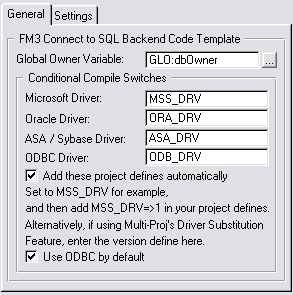
| General | Global Owner Variable | This is the variable that is used to contain the owner variable for the tables. This variable is the same as specified in the owner attribute in your dictionary |
| GloVar For Backend Type field | Create a global variable - and for ODBC connections, you can enter this here and FM3 will store which database you're connecting to in the variable. This is useful if you support multiple different backend types and want to perform different functions depending on the backend type. | |
| Conditional Compile switches | There are project defines that you need to add to your project (for drivers that you are supporting).You can leave these as is, unless you're using Multi-Proj's driver substitution (in which case you'll need to match these up with the project defines that you've used in the Multi-Proj template) | |
| Add these project defines automatically | By default this is checked on, this is because most people don't use Multi-Proj (yet). To make is easier for you, FM3 can automatically set the project defines for you, based on the drivers you've selected in the Global Extension template. | |
| Use ODBC by default | If the ODBC driver is activated, then you'll probably want to use it by default. This sets the option at runtime (if no value is returned from the INI stored settings). | |
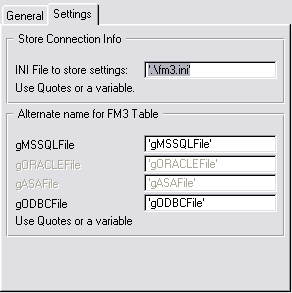
| Settings | INI file to store settings | The name of the file to store the connect window settings for future sessions. |
| Alternate name for FM3 table | FM3 has a table declaration for each file structure in order to obtain info about the database structure from the backend. If this name clashes with a variable or file in your dictionary, then you can rename it here. | |
| Set filenames with the FM3Ignore user option | You can set FM3 to prime the field names of your SQL tables, even if they have the FM3Ignore file user option set in the dictionary. |