Upgrading from SimTabTree? Take a look at
this FAQ
Introduction
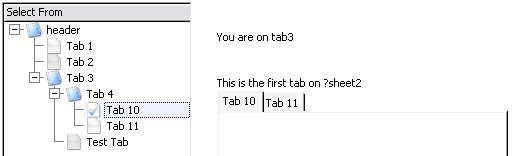
TabTree allows you to add a Sheet-Management control
to a window. It creates a list of all the tabs in a list box. You can then
navigate between tabs using either the keyboard or mouse and the list
itself.
This approach is especially useful on windows where the sheet control
contains many tabs, so many that the sheet control "overflows". It's also
very useful on windows where you have Sheet Controls on another tab. By
presenting the tab list as a tree, the layout of the window becomes a lot
simpler.
Features:
- User friendly and modern looking tab selection.
- Handles nested Sheet controls (i.e. sheets on tabs).
- Allows you to set the Sheet as Wizard and/or NoSheet at runtime -
thus making design easier.
- Tree selection matches tab selection (where tabs are
programmatically selected).
- Multiple TabTree controls on each window.
- Automatically scans all the Sheet and Tab properties and builds the
list appropriately.
- Supports Single EXE and Multi-DLL.
Jump Start
- Open your application in the Clarion IDE.
- Add the Activate CapeSoft TabTree Global
Extension template to your application. To do this, Click on Global,
then Extensions, then Insert,
scroll down to the Class TabTree templates
and double-click on the Activate CapeSoft TabTree
template.
- Now open the window containing a sheet that you want to replace with
the TabTree list, and proceed to the window formatter.
- Make some space in your window for the TabTree list box (usually on
the left).
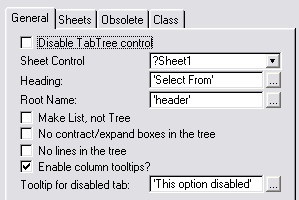
- Place the TabTree control template on your window. To do this, from
the Populate menu, select Control
Template... and select the SimTree
control template from the Class SimTabTreeControl items. You don't
need to select a Queue in the From field - and if Clarion prompts you
for one, simply click the cancel button.
If you are adding this to a MultiDLL application, then follow the steps in
the
Multi-DLL section of this document.
The TabTree Templates
The Global Extension Template

- Click the Disable all TabTree features
checkbox to disable TabTree globally. This is useful for debugging -
if you suspect that TabTree is causing problems in your application
(compile or otherwise).
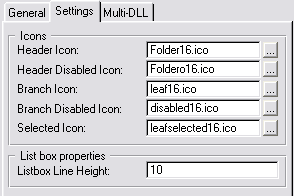
- The Icons group is used to specify
icons used by default for the items in the tab tree lists throughout
your application.
- The Header Icon is used to show sheet
entries in the tab list
- The Header Disabled Icon is used to
show sheet entries (or tabs with sheets on them) that are
disabled.
- The Branch Icon is used to show
selectable tabs
- The Branch Disabled Icon is used to
show tabs that are disabled.
- The Selected Icon is used to show the
tab that is currently selected.
- The Listbox Line Height is used to
globally set the listbox lineheight. If KeepingTabs or Makeover is
added to this application, then this entry field will not be
available.
- INIMgr.Fetch returns a value is used for
compatibility with old INI Managers, and is not usually on for
modern Clarion versions.
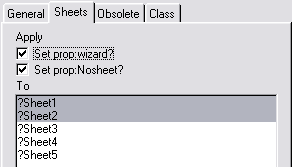
- Apply Wizard/Nosheet to Selected Sheet If this is
on and a TabTree control has either the Set Prop:wizard or Set
prop:Nosheet set, and no sheets are selected in Sheet Selection,
then the prop:Wizard and/or prop:Nosheet will be applied to the
Sheet Control (as set on the General tab for that TabTree control.)
This global option exists for backward compatibility - if you
specifically don't want he control to be a Wizard etc then tick this
option off.
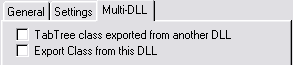
- This is part of a Multi-DLL program: If this app
is part of a Multi-App system (ie where you are creating your own
DLL's from multiple apps) then tick this option on. Do this for all
DLL apps and EXE apps in the system.
- Export TabTree Class from this DLL: If the above
option is on, then in the Data DLL(*) (and only the Data DLL) turn
this option on. The Data DLL is the one that exports all your file
declarations.
(*) Advanced: You can export the class from any of your DLL's - it
doesn't have to be the Data DLL. However any other app that contains
the TabTree control needs to link in whichever DLL is exporting the
class. The simplest approach is to put it in the Data DLL, but it is
possible to use a different DLL.

- The classes tab allows you to inspect, and refresh the classes
automatically read in from the TabTree.Inc file. The Class version
is the date of the last read.
TabTree Control Template
Using TabTree in Multi-DLL applications
In your Data-DLL:
- Add the TabTree Global Extension template
- On the Multi-DLL Tab turn on both options..
In your other applications (that require the use of TabTree in that
application) including DLL's and EXE's:
- Add the TabTree Global Extension template
- On the Multi-DLL Tab turn on ONLY the first option.
TabTree Frequently Asked Questions
Check out general product
CompilerErrors.
Runtime Problems
Feature Questions
Upgrading Issues
1.1) I have a contract box on my root - but it won't
contract the list?
This is unfortunately a limitation of Clarion (as of writing - C6 9058).
You will need to switch to using a root (see the
template
section) which will not have the contract box.
2.1) How do I change the icons?
In the Global extension you can choose which icons to use for the
tree. At the local level you can override the icons for any one TabTree
control.
2.2) How do I Hand Code TabTree, do you support hand
coding without templates?
TabTree, like almost all of our products, is straight forward to hand
code. We recommend using the template as a "quick start" for hand coding,
as they generate the project and basic code for you:
- Create a new empty application. This can be ABC or Legacy.
- Add the TabTree global extension, and add a window with one or more
Tab controls (you can import a window from an actual application,
which can be helpful).
- Add the TabTree local extension.
- Generate the application
This provides you with the basic code that you need to use TabTree, and
you can export the Project file from the application in order to see what
needs to be added to your Project. This approach in very helpful for using
any of the CapeSoft templates in a hand coded application, and allows you
to use the templates and generator to build the basic code for you. The
code can then be copied and pasted into your hand coded applications and
modified as needed.
3.1) How much does it cost to update to the latest
version of TabTree from previous versions?
It is CapeSoft's policy not to charge for updates for as long as we can,
so typically you can upgrade to the latest release of TabTree from any
previous version for free. Visit the CapeSoft web site at
www.capesoft.com
to get the latest version.
3.2) How do I upgrade from
SimTabTree to TabTree?
You must only add the TabTree global extension to your application. The
other settings will remain consistent from the SimTabTree local extension
template.
Support
Your questions, comments and suggestions are welcome.
See our web page (
www.capesoft.com)
for new versions. You can also contact us in one of the following ways:
| CapeSoft Support |
| Email |
 |
| Telephone |
+27 87 828 0123 |
| Fax |
+27 21 715 2535 |
| Post |
PO Box 511, Plumstead, 7801, Cape Town, South Africa |
| CapeSoft Sales |
| Web |
www.capesoft.com
|
| Email |
 |
| Telephone |
+27 87 828 0123 |
| Fax |
+27 21 715 2535 |
| Post |
PO Box 511, Plumstead, 7801, Cape Town, South Africa |
Installation
Run the supplied installation file.
Distribution
TabTree is supplied as source and compiled into your application, you do
not need to ship additional files.
Examples
Notes on getting started.
Start Here
There is an example in your
\Clarion\3rdParty\Examples\TabTree\ directory. The examples are
a great way to get started and see a few of the ways you can use CapeSoft
TabTree.
License & Copyright
This template is copyright © 2021 by CapeSoft Software. None of the
included files may be distributed. Your programs
which use TabTree can be distributed without any TabTree royalties.
Each developer needs his own license to use TabTree. (Need to
buy
more licenses?)
This product is provided as-is. Use it entirely at your own risk. Use of
this
product implies your acceptance of this, along with the recognition of the
copyright
stated above. In no way will CapeSoft Software, their employees
or affiliates be liable in any way for any damages or business losses you
may
incur as a direct or indirect result of using this product
Version History
Download latest version
here
Version 2.21 (25 May 2021)
- Add: Clarion 11.1 to install.
Version 2.20 (18 Sept 2018)
- Add: Clarion 11 to install.
Version 2.19(27 June 2016)
- Fix: In Clarion 10, in the Window Designer, the Sheet list (for
Sheet Control setting) could be blank.
Version 2.18( 1 June 2015)
- Moved PrepareAlerts code.
- Moved bumpup test in SetSheetProps
Version 2.17( 25 February 2015)
Version 2.16 (3 February 2014)
Version 2.15 (13 September 2013)
- Add: Wizard and NoSheet properties for all primary Sheet controls
can be set from Global extension.
- Add: Activate Auto Tab Trees Global Extension.
- Change: Default Header changed from "Select From" to blank.
- Change: Default "Make List Not Tree" changed from 0 to 1
- Change: Default for "Set Prop Wizard" changed from 0 to 1
- Change: When control template is populated onto a window, it
populates to a default spot (it can be moved and resized after that.)
- Fix: If Column Header is completely blank (no empty quotes) then a
compile error occurs.
- Update: Documentation updated.
- Add ControlWidth and ControlOffset properties to class.
- Add: Init, SetSheetProps, SetWindow and _BumpChildren methods to
class.
Version 2.14 (1 May 2013)
- Build for Clarion 9
- Link attribute added to class, name attribute removed from the _Look
method
Version 2.13 (14 March 2013)
- Changed to Ver4 object/template management system. IMPORTANT
READ
THIS.
- Add: support for Multi-Proj in C8
Version 2.12 (25 January 2013)
- Fix: Added Trace method to Export list.
Version 2.11 (23 January 2013)
- Add: Trace method to class
- Fix: Removed variable ds which was being declared in the CLW module.
Version 2.10 (28 June 2010)
- Move RebuildTabTreeQueue to PrepareAlerts (for both ABC and legacy).
- Global check in template to switch INIMgr return on or off.
- Remember tab turns KeepingTabs off (otherwise conflict).
- Class change - if Select pos is blank, then get the legal tab
(rather than self.selected, which might not be legal anymore).
Version 2.09 (25 November 2008)
- Clarion 7 support for #pdefine (was not adding the project define
automatically in Clarion 7).
Version 2.07 (10 November 2008)
- Clarion 7 compatible install.
- New methods: Next and Previous make programmatic navigation easier.
Use the WrapAround parameter to generate a continuous Next/Previous.
Version 2.06 (11 July 2008)
- Template fix - regression in 2.04. Removed superfluous reference to
removed template variables.
Version 2.05 (8 July 2008)
- Template fix - regression in 2.04. Removed superfluous reference to
removed template variables.
Version 2.04 (17 June 2008)
- Fix for contract box in the root of the tree (requires a root for
the tree in the control template prompts).
- Removed NoLines and NoBoxes superfluous tree options from the
control template options.
- Improved FAQ documentation.
Version 2.03 (3 June 2008)
- Fix for legacy Multi-DLL applications. Compile error exporting the
_Look function of the TabTree class.
Version 2.02 (28 May 2008)
- Fix for legacy applications - syntax error in the template.
- Legacy applications - stores the tab selected in an INI file.
Version 2.01 (26 May 2008)
- Include old SimTabTree icons in the install.
Version 2.00 (21 May 2008)