



www.capesoft.com
Updated 07 June 2011

| NetTalk Document Suite - Learning NetTalk | |||
|
|
|
||
|
|
|||
| Version
www.capesoft.com Updated 07 June 2011 |
|
||

 |
 |
 |
 |
|
 |
 |
 |
Learn NetTalk |
Examples |
Common
|
NetAuto
|
NetSimple
|
Dial-Up |
Support |
Version History |
 = recommended reading
| Contents - Learning NetTalk | |||
|
|
I'm New to NetTalk | ||
|
|
Introduction to NetTalk | ||
|
|
Jump Starts (great for new users and beginners) | ||
|
|
Web Server FAQ (good starting place for Web Server users) | ||
|
|
Examples | ||
| Object overview (quick lookup reference) | |||
|
|
|||
| Copyright, license and distribution | |||
| Where can you get NetTalk from? | |||
| Installation instructions | |||
| NetTalk's background | |||
|
|
What is a client and a server? | ||
|
|
Using NetTalk in your Application | ||
| Introduction to TCP/IP | |||
| Contents - NetDUN (Dial-Up) Object | |||
| Programming - Adding Dial-Up Networking to your application | |||
| NetDUN Object - Dial-up functionality | |||
|
|
Jump Start for NetDUN JUMP START | ||
| NetDUN Properties | |||
| NetDUN Methods | |||
| NetDUN Data Structures | |||
 I'm
New to NetTalk (recommended reading)
(recommended reading) - which are sections that will help you understand
NetTalk more and in turn not only will you be able to create better applications
but you will be able to develop them faster.
I'm
New to NetTalk (recommended reading)
(recommended reading) - which are sections that will help you understand
NetTalk more and in turn not only will you be able to create better applications
but you will be able to develop them faster. Introduction
 |
This section will help you find out what NetTalk offers and it describes the difference between the NetAuto and NetSimple objects. |
|
Object Overview |
A key place for quickly finding help on the different NetAuto & NetSimple objects. |
|
Definition of NetAuto "Server" & "Client" |
A good concept definition that is essential for you to grasp before you tackle network applications. |
|
Using NetTalk in your application
|
A very good guide as to which objects you should use. This section will also lead you into the 2nd and 3rd documentation files. |
|
Examples |
We've also packaged an excellent selection of examples with NetTalk. You may often want to read the documentation in conjunction with these examples, that are found in your Clarion/3rdParty/Examples/NetTalk folder. |
|
Debug & Logging Section
Error Messages
FAQ |
This section will help you debug your code. We've also added an error messages and a FAQ (Frequently Asked Questions) section. |
|
Support |
If you need support please check this section first to guide you through the getting support procedure. |
Introduction
(recommended reading)More and more users are discovering that NetTalk is the premier TCP/IP solution for Clarion programmers. This isn't too surprising given the amazing power, coupled with ease of use, that NetTalk provides. Here's a brief outline of some of functionality available to you:
1. NetAuto Objects
The NetAuto objects support the NetAuto protocol. These objects provide you with the following functionality:
- The tools to add robust, automatic error-recovery, network communication (between two or more computers or processes) to your applications over a TCP/IP LAN (Local Area Network) (For, WAN (Wide Area Network) and the Internet we suggest using the NetSimple objects).
- The ability to build network applications without having to use a shared file to communicate between separate applications. With NetAuto you can just pass your inter-application messages directly from one application to another. This is far more efficient and faster. No more file polling.
- The ability to let NetAuto take care of all the difficulties associated with socket programming. NetAuto presents you with easy to use objects that do all the hard work for you.
- Various useful utilities shipped in template form, which include:
Time Client & Server which allows time synchronization between PCs. File Client & Server which allows you to send files from one PC to another without needing to share and map drives. NetChat Control Template which enables two or more PCs to hold a live chat conversation. (see NetChat) Close Apps Control Templates which enables you to remotely close down an application. This is a great feature which allows network administrators to close down all instances of your application (running over a network) from just one PC. Simply add it to your app and you won't ever have problems trying to get everyone to shut down their apps all at once again. Use Remote Machine Control Template which enables you to use the NetAuto protocol to communicate with a machine that is not on your LAN. This means you can connect to machines over the Internet or you Intranet. UseRefresh Template which enables you to command a refresh to all instances of the program so that all browses, forms, etc. are refreshed immediately after a user saves changes to a record. 2. NetSimple Objects
The NetSimple objects support normal Winsock and socket communication. These objects provide you with the following functionality:
- The functionality to establish socket connections and listen on sockets so that you can interface with other programs and other Internet protocols. e.g. FTP, Web, Mail or C or Java applications etc. NetTalk makes building client/server network applications a piece of cake.
- Full Email (SMTP and POP) and NetNews support which includes sending and receiving attachments.
- Web (HTTP & HTTPS (Secure HTTP using SSL)) client object which allows you to download web pages (in fact all file types) as well as allowing you to post form data to web servers.
- The ability to let NetSimple take care of all the difficulties associated with socket programming. NetSimple presents you with easy to use objects that do all the hard work for you.
- Support for machines that receive Dynamic IPs. The DIP (Dynamic IP) object allows other processes to know where you are. This allows you to behave as if you had a permanent IP address.
3. NetDUN Objects (Dial-Up Networking)
The NetDUN objects allow you to add Dial-Up functionality into your application.
- The ability to connect and disconnect dial-up connections
- The ability to create, edit or delete dial-up connection settings.
- The ability to detect when a dial-up connection has been made on the computer.
NetTalk builds TCP/IP communication between two or more computers (or processes) into your application. These processes don't have to be on the same machine in order to perform the communication. If you already have a TCP/IP platform, then it is a simple matter of adding the templates to your applications, while if you don't, it's a straight-forward task to add the TCP/IP protocol to the network (see How to add TCP/IP to your network). NetTalk provides you with easy-to-use functionality for adding network communication to your application.
Jump Starts (recommended reading)
 |
Keen to get started?
Then this section is just for you - the
basics on how to get NetTalk into your
application as quickly and simply as
possible. |
We've included a number of step-by-step jump start examples that will help you add NetTalk to your application in almost no time at all.
| Jump Starts | |||
|
|
NetSimple Objects |
||
| Sending Emails | For sending emails. | ||
| Receiving Emails | For receiving emails. | ||
| Web(URL) | For adding Web functionality (i.e. Download files or web pages) using HTTP or HTTPS (Secure HTTP). | ||
| FTP | For FTP functionality (get directories, put or get files) | ||
|
|||
| Scenario One | Single packet NetAuto Client/Server | ||
| Scenario Two | Broadcasting packets NetAuto Client/Server | ||
| Scenario Three | Multiple packets NetAuto Client/Server | ||
|
|||
| Chat Controls | For adding the Chat Controls to your application to create a simple text chat application. | ||
| Close App Controls | For adding the Close App Controls to your application to allow your application to be shut down remotely. | ||
| DIP | For adding the NetDIP (Dynamic IP Management) functionality into your application. This will let your application run in "server" mode even though the IP of your machine may change or may be unknown to your clients. Particularly useful for WAN or Dial-Up. | ||
| NetRefresh | For adding the NetRefresh functionality to your application. NetRefresh allows your browses to automatically refresh when someone else (on another machine) updates data. | ||
| Use Remote Machine Controls | For adding the UseRemote control template to your application. (More advanced). | ||
Please remember that the you should still read through the documentation (specially the scenarios) if you want to get the maximum functionality of NetTalk into your applications.
Examples (recommended reading)NetTalk comes packed with examples. Here are a couple tips for getting your teeth into NetTalk:
- All examples are found in your Clarion/3rdParty/Examples/NetTalk folder.
- There is also a list of Jump Start examples in the Jump Start section.
- There are three scenarios (with source) which can provide the basis of a NetAuto objects tutorial. These tutorials are explained here. (Even if you are only wanting to use the NetSimple objects, these scenarios will help you understand how to use NetAuto/NetSimple objects in your application).
- The NetDemo application, is the largest and most feature complete example. Make sure you have a look at this one.
- You can also look at the source code for the NetTalk objects which are found in your Clarion/LibSrc folder. The NetTalk files (net*.clw and net*.inc) contain the code for all the NetTalk objects.
NetDemo Application
| Examples | |||
|
Folder |
All examples in Clarion/3rdParty/Examples/NetTalk |
||
| Demo |
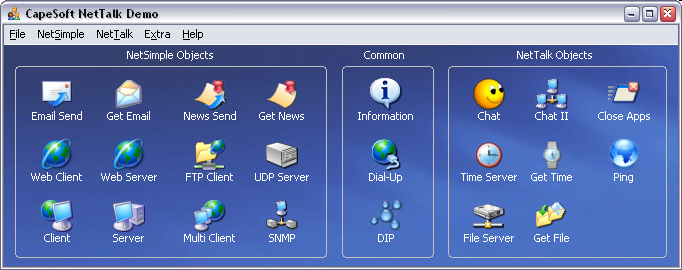
Updated This is the classic NetTalk demo application. It demonstrates the chat, Internet use, time transport, file transfer, auto close, client socket connections (NetSimple), listening server ports (NetSimple), Email send and receive, News send and receive, DIP (Dynamic IP) management, FTP, Web Client, Web Server, Ping and more. Note: This application uses HyperActive. If you do not have hyperactive you will receive a warning the first time you open the application saying "Unknown template type GloHyperActive(HyperActive)". Click OK a couple times and the application will run without HyperActive. This is not a problem. This example is the free demo that is available in an EXE at www.capesoft.com. |
||
|
|
|
||
| Scenario One | This is
scenario one.
|
||
| Scenario Two | This is
scenario two.
|
||
| Scenario Three | This is
scenario three.
|
||
| NetAuto File Get | A simple example of File Transfer using the NetFileServer and NetGetFile objects. It's even more simple than the example in NetDemo. | ||
| NetAuto File Get And Put | An example of using File Transfer to Put Files and Get Files. | ||
| NetRefresh | This is a simple example of
NetRefresh working. |
||
| Server DIP | This is source code for the
DIPServer. It requires the CapeSoft
WinEvent and looks better if you use CapeSoft's
HyperActive template. It's an example but can be used to run a DIP Server.
If you require the DIPServer.exe please download it from the NetTalk download page at www.capesoft.com . For more info on the DIP (client) object please look at the DIP object section. Note: If you are compiling in C55, please open the application (which will convert it from C5), Generate All, then remove the C5ASC%%L%.LIB in the Project Editor (Press the Project button). Then recompile. Note: If you are compiling in C60, please open the application, Generate All, then remove the ASCII drive from the Project Editor. Then recompile. |
||
| Server AutoChat |
This is the Automatic Chat
Server (Arnold) that runs the whole time at
CapeSoft. It's the Server that responds to the
Internet Chat part of the netdemo.app Requires WinEvent. |
||
| NetOptions | An example of how to use the
NetOptions
method call. (Includes reading and setting the Ports, NetName, Max Instances,
HostName & IP address etc.) |
||
|
|||
| FTP Download Directory | This is the example of how to download all the files in a directory using
the FTP object. |
||
| FTP Jump Start | This is the example of the
JUMP
START
FTP code. |
||
| FTP Multiple Upload |
FTP Multiple File
Upload. |
||
| FTP Template | New FTP Template example | ||
| LinkPoint Payment |
New LinkPoint Credit Card Payment Example Requires a LinkPoint account (or a trial one), a LinkPoint Certificate (real or trial) and CapeSoft's xFiles. |
||
| NetSimple Jump Start |
New
NetSimple JUMP
START |
||
|
NetSimple Packet Boundaries & Encryption (Automatically and Manual) - Automatic is the recommended option. |
New NetSimple
Client Server example of how to manage packet
boundaries. This can be a little bit confusing at
first, (that's why we made the NetAuto objects) but this example will show you how to do it. See
FAQ G2 for
more information about Packet Boundaries. This
example also demonstrates how to use the
NetDESencrypt and NetDESdecypt functions. |
||
| NetSimple Client & Server |
New NetSimple Client Server Test. Uses
normal TCP/IP or SSL. |
||
| Web Jump Start | This is the example of the
JUMP
START
Web code. |
||
| Web Polling Agent |
This is a Web poll example of checking web sites |
||
| Web Strain |
This is a Web example of
looping quickly through web sites |
||
| Web Server |
Removed This example has been replaced by the
NetWebServer and _NetWebServerWorker objects. See the NetDemo application for an
example of this. |
||
| Web Server In Memory - Connection Checker. |
This is an example of creating web pages in memory. Normally you would have web
pages on disk, but that not always necessary. This example requires
Clarion 6.1, SelfService and WinEvent (as well as NetTalk of course). This app will check a TCP/IP connection, and will send you an email if the port can not be reached. Useful for checking: - network route reachability, - if an application is still running - or if a machine is running (try using port 139) |
||
| Email Send Jump Start | This is the example of the
JUMP
START
Email Send code. |
||
| Email Send in a Process | This is an example of sending an email from
within a process. (In the "SendEmail in
a Process" folder). |
||
| Email Send PDF Report | This is an example of emailing an PDF Report generated by
PDFXChange. See
the details in the PDFXChange section.
(Note you need Tracker Software's PdfXChange (www.docu-track.com)
template to run this example.) |
||
| Email Receive Jump Start | This is the example of the
JUMP
START
Email Receive code. |
||
| Email Receive with Don't Download Again Option | This is the NetDemo.app's
TestEmailReceive window, with an
xFiles object to
save the self.EmailsDoneBeforeQ to an xml file so that this queue persists. |
||
| Server DIP | This is source code for the
DIPServer. It requires the CapeSoft
WinEvent and looks better if you use CapeSoft's
HyperActive template. It's an example but can be used to run a DIP Server.
Requirements: This requires WinEvent, NetTalk & HyperActive to compile correctly. You can get away without HyperActive, but you will definitely need WinEvent. If you require the DIPServer.exe please download it from the NetTalk download page at www.capesoft.com . For more info on the DIP (client) object please look at the DIP object section. |
||
| SNMP Jump Start |
SNMP
JUMP
START |
||
| Proxy | This is an example of using NetSimple to create a
Debugging Proxy Tool.
Documentation can be found in the separate NetTalk Proxy Document. Requirements: This requires WinEvent, NetTalk & HyperActive to compile correctly. You can get away without HyperActive, but you will definitely need WinEvent. If you require the proxy.exe please download it from the NetTalk download page at www.capesoft.com |
||
| Web Builder Email Send | This is an example of using
WebBuilder
and NetTalk. (Clarion 5.5 upwards). This example is not included in the NetTalk download, and must be downloaded separately from the NetTalk download page at www.capesoft.com . |
||
|
|||
| DialUp Jump Start | This is the example of the
Dial-Up JUMP
START
DUN code. |
||
| DialUp Hand Code |
This is an example of hand coding the Dial-Up object. |
||
|
|||
| Multi DLL ABC | Multi-DLL example
ABC application. This is just an example of how to use
the NetTalk templates if are building a multi-DLL application. |
||
| Multi DLL Legacy | Multi-DLL example
Legacy application. This is just an example of how to
use the NetTalk templates if are building a multi-DLL application. |
||
| Multi DLL Legacy Email | Multi-DLL example
Legacy
application using Email. |
||
|
|||
| Legacy | NetLeg.app - This is a Legacy example.
|
||
| Legacy | LegEmail.app - This is a
Legacy
example application. If you use the Secure Email Sending, please ensure you
include the SSL DLLs (see the
Distribution section for details) in the application folder. |
||
| Multi DLL Legacy | Multi-DLL example
Legacy application. This is just an example of how to
use the NetTalk templates if are building a multi-DLL application. |
||
| Multi DLL Legacy Email | Multi-DLL example
Legacy
application using Email. |
||
|
|||
| Proxy | This is an example of using NetSimple to create a
Debugging Proxy Tool.
Documentation can be found in the separate NetTalk Proxy Document. If you require the proxy.exe please download it from the NetTalk download page at www.capesoft.com |
||
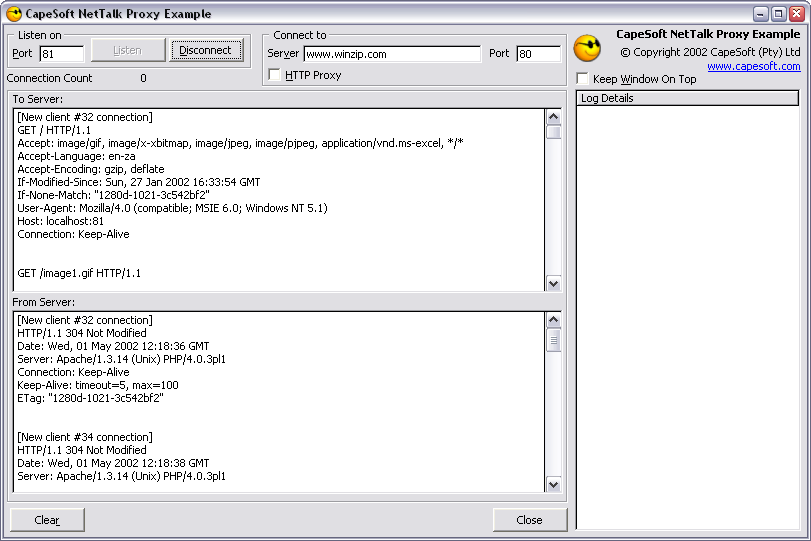
Proxy Debugging Example Tool
Object Overview (recommended reading)
(quick lookup reference)NetTalk presents you with the following objects & templates:
Global Templates
Activate_NetTalk This Global Template must be added to your application to use any of the following features. Use_NetRefresh Add this Global Template to use NetRefresh in your application.
Control TemplatesChatControls This control template quickly adds all the chat controls to your window. CloseAppControls This control adds the controls for closing down your application remotely. SendEmailControls This adds basic controls for sending email. For more functionality you will need to use the NetSendEmail object directly. UseRemoteMachine Adds the controls to connect to remote machine on a WAN or the Internet. Most people will probably rather use the NetDIP object to do this now.
NetAuto Objects
|
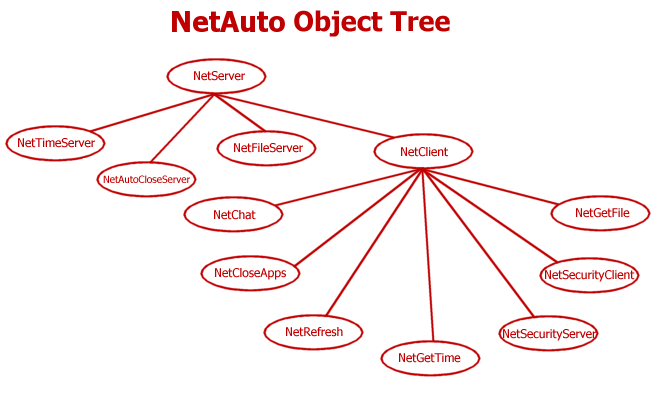
NetServer NetClient |
The Main NetAuto objects. These provide you with the greatest degree of flexibility when using the incredibly robust NetAuto protocol. | |
|
NetAutoCloseServer NetCloseApps NetChat NetGetFile NetFileServer NetGetTime NetTimeServer NetRefresh |
Specific objects based on the NetAuto technology (NetServer & NetClient). Some of these objects can be included into your application using Control Templates or Extension Templates. | |
| NetSecurityServer NetSecurityClient |
These are unsupported at the moment, but will form joint functionality with CapeSoft's Secwin product to provide licensing control to applications. | |
|
||
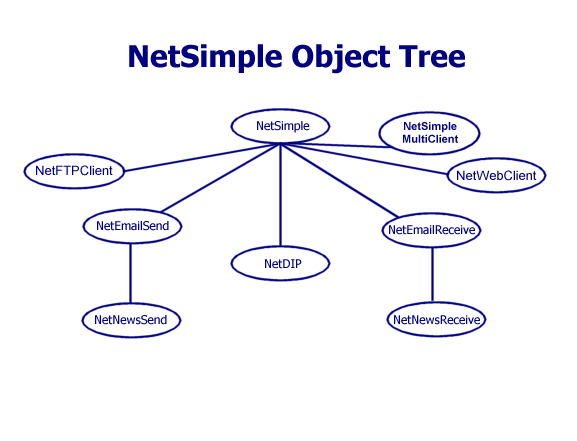
| NetSimple | This object allows you to establish client socket connections to another server, or to behave like a server and listen on a port for incoming connections. | |
| NetSimpleMultiClient | This object allows you to establish multiple clientsocket connections to another server. | |
|
NetEmailSend NetEmailReceive |
These objects allows you to send and receive email. | |
|
NetNewsSend NetNewsReceive |
These objects allows you to send and receive news. | |
| NetDIP | This object provides Dynamic IP Management to your application. This object allows you to connect to a DIP server, which will tell your application instance about all the other people running your application. | |
| NetFTPClient | These two objects (NetFTPClientControl & NetFTPClientData) allow you to build FTP clients to connect to FTP servers and download and upload files. | |
| NetWebClient | This object allows you to connect to web servers and download pages as well as posting data to web page forms. |
NetDUN This object allows you to add Dial-Up Networking to your application.
Copyright,
License and DistributionThis product, and all the files contained therein, are copyrighted by CapeSoft Software (Pty) Ltd who trade as CapeSoft. You will, however, need to copy the following files and distribute them with your applications if you compile your application in Standalone mode:
c[5/55/60]netx.dll (found in your Clarion/3rdParty/bin folder)
c[5/55/60]runx.dll (found in your Clarion/bin folder)
c[5/55/60]dosx.dll (found in your Clarion/bin folder)
NetTalk uses the DOS driver (which is automatically added to your project by the NetTalk template).
Secure Sockets Layer (SSL)
If you use any of the SSL features in NetSimple, then you will need to distribute the msvcr71.dll, ssleay32.dll, libssl32.dll and libeay32.dll which can be found in your Clarion/3rdParty/bin folder. It's best to distribute these DLLs into the application folder.
This product is copyright 2000-2008 by CapeSoft Software (Pty) Ltd.
You are not allowed to copy any of the other files, including but not limited to, Template (TPL) files, Library (LIB) files, net*.clw, net*.inc and documentation files.
Each developer needs his own license to use NetTalk. (Need to buy more licenses?)
This product is provided as-is. CapeSoft Software (Pty) Ltd (trading as CapeSoft), employees of CapeSoft, and Dealers of CapeSoft products, explicitly accept no liability for any loss or damages which may occur from using this package. Use of this package constitutes agreement with this license. This package is used entirely at your own risk.
Where can you get NetTalk from?Remember: Upgrades at the moment are free, so please make sure you keep up-to-date with the latest version of NetTalk.The full working version of NetTalk is available from:
CapeSoft Sales Web Telephone Fax Post
Buy Online Web
Registered users can download the latest upgrade from the web site www.capesoft.com - so it's important to register!
Go to www.clarionshop.com to purchase and register. You will then be sent your password to unlock the product.
Installation InstructionsTo install NetTalk run the supplied installation program. Download the latest version of NetTalk from: www.capesoft.com/nettalkd.htm.
NetTalk BackgroundSo, where did NetTalk originate? I'm sure the majority of programmers at some point in time have wanted to create a communication system between two PCs using one form or another. You may have wanted to synchronize the times between two PCs (very useful in process orientated environments) or periodically update information from one PC to another, without having to manually ensure that each PC periodically checks a common file. Well that's where NetTalk comes in. It does all this difficult work for you.
NetTalk has been implemented as a set of Objects, which provides for an easy, consistent interface to the various features. It also allows you to extend, and change the existing behavior. There are two main objects. The two major types of NetTalk objects: The NetAuto objects (NetServer, NetClient and their children) and the NetSimple object.
With NetAuto, the NetServer object and the NetClient objects provide you with the ability to use the robust NetAuto network communication protocol in your application. We have provided some other objects, which are based on the NetServer and NetClient objects. These objects are discussed in the Using The Other NetAuto Objects section.
The NetSimple object allows you to talk directly to socket ports or to listen on socket ports. This gives you the functionality to interface with any socket enabled application or server, without the head-ache of having to do your own windows socket programming. Some examples of this are: Interfacing with Mail Servers (see our Email objects based on NetSimple), Web Servers, FTP Servers, or interfacing your Clarion application with other applications written in C or Java.The NetTalk suite has been developed by CapeSoft's finest programmers including (although not limited to) Bruce Johnson & Jono Woodhouse.
What is a "Client" and a "Server"?
(recommended reading)Definition: A Client is the process that initiates the conversation.
Definition: A Server cannot initiate a conversation - it only responds to incoming requests.
A process that requests information is called a client, while the process that receives a request and then provides a reply to that request is a server. Thus a TimeClient is the process that will request the time from the TimeServer, which supplies the TimeClient with the correct time.
In some cases a process (such as a Chat program) will be both the client and the server. It can both initiate conversation and respond to conversation. It initiates conversation when the user clicks the button to send the Chat string, and it responds when someone else sends it a Chat string.
In fact a client is also always a server (in that it listens to replies), whereas a server is not a client because it does not initiate communication. If we use an analogy of the telephone (described in more detail in the TCP/IP section), we find that a telephone is both a client and a server. The telephone can dial (initiate communication), but it can also receive calls (server mode). Whereas an answering machine is only ever a server (it never initiates communication), it only records a conversation initiated by someone else.
Using NetTalk in your Applications (recommended reading)The following section describes how to use NetTalk in your applications. NetTalk shields you from the complexities of network communication, so you will soon find that it is easy to implement NetTalk communication in your application. We've put together five ways that you can use NetTalk in your application
1) I want to use the Control or Global Templates - This is a very quick and simple method to drop NetTalk functionality into your application. It only gives you the functionality of the pre-built Control Templates. A number of control templates exist, more will come later. Click here for the Control Templates section to learn how to do this.
Use_NetRefresh (Global Template) - uses NetAuto to add functionality so that data changes in one application get reflected immediately on the screens of all other applications using this data. (LAN Only)2) You can use some of the other pre-built NetAuto objects for LAN Only environments -
ChatControl (Control Template)- adds a NetAuto Chat facility to your application (allowing you to send text Chat strings over the network). (LAN Only)
CloseAppControls (Control Template)- adds the remote application closing functionality (allowing someone like a system administrator to remotely close down all instances of your application) using NetAuto. (LAN Only)
UseRemoteMachineControls (Control Template)- adds the ability to use NetAuto over a WAN or the Internet by connecting you to remote machines. (LAN Only)
SendEmailControls (Control Template)- adds the basic controls for using sending email.FTPControls (a set of 2 extension and control templates, as well as a utility to import the FTPFiles procedures) - adds the basic FTP functionality to your program.
These include the:
• Time Client/Server
• File Client/Server
• Close Application Client/Server
• Chat Client & Server.
These objects will allow you to quickly add file transfer, time synchronization, remote application closing or chat functionality to your application. These objects are described in the Using the Other NetAuto objects section. The Chat and Remote Application closing objects are provided as Control templates.3) You can use some of the other pre-built NetSimple objects for accessing Internet Protocols -
These include the:
• Web Client (for HTTP and HTTPS)
• Web Server
• Email Sending (SMTP)
• Email Receiving (POP3)
• News Sending or Receiving (NNTP)
• FTP Client
These objects will allow you to quickly add their respective capabilities to your application.4) I want my application to be able to communicate over a LAN network to other applications I write - Gain the full power of NetAuto. NetAuto allows you to make instances of the powerful NetServer and NetClient objects. You can then derive your own functionality from them. This is the most powerful and flexible way of using NetAuto. To explain how to do this we have created three scenarios which will help you to see examples of how to generate your own network applications. Click here for the Programming - NetAuto Protocol and NetAuto objects section to learn how to do this.
5) I want my application to be able to communicate over a LAN, WAN or Internet to other applications I write - While the NetAuto objects offers LAN capabilities the NetSimple objects offer you the ability to talk over a LAN, WAN or the Internet. These are very powerful and easy to use objects that allow you to communicate using standard TCP/IP or UDP. Read more about the NetSimple Objects.
6) I want my application to talk to other network applications. You can talk directly to a port on a machine. This is handy when you want interface with another process that does not use the NetAuto protocol. For example you may want to access a Java, C or C# network application. In these cases you will use the NetSimple object. This is described in more detail in Simple Connections to a Port section.
7) (Very Advanced Users Only): You can call the NetTalk DLL functions directly. 99% of the functionality of NetTalk has been coded into the NetTalk objects and control templates which create an easy way for you to use NetTalk. If you are a hard core programmer you may want to call some of the DLL functions directly. Some of these functions will allow you to set various options, or get network information. The DLL functions are described in more detail in the DLL functions section. You will probably also want to look at the code in the net*.clw and net*.inc files in your Clarion/LibSrc folder.
Remember:
We have also included a whole set of examples and the scenarios in the Clarion/3rdParty/Examples/NetTalk folder. For more details see the Examples section.
You can also look at the source code for the NetTalk objects which are found in your Clarion/LibSrc folder. The NetTalk files (net*.clw and net*.inc) contain the code for all the NetTalk objects.
Introduction
to TCP/IPTCP/IP communication takes place via sockets. If we use an analogy of a telephone call, we can understand how TCP/IP communication works. To start with you need to install a telephone. Once this phone is installed it listens for incoming calls. In terms of socket programming this is known as establishing a listening socket, that listens for incoming socket calls. Every Server will need to establish this listening socket to receive information on.
Once we have a installed a telephone, we now need to call this phone. In socket programming this is done by creating a socket (like another telephone) and then connecting (dialing) to the listening socket (our first phone that we installed). Once the call is established the two telephones are able to communicate with one another. In socket programming terms, once this connection has been established, the data will be sent to the other machine in a container known as a packet. A packet is just a bundle of data. When you go to the supermarket you might get a month's worth of shopping in one go, but you walk out the shopping center with a number of packets. The contents of all your packets makes up your entire shopping content, but keeping them in small packets makes them more manageable, and easier to load into your car. It's the same with the TCP/IP. Large objects that need to be transferred will be broken down into smaller packets, transferred over the network and assembled again on the other side. This forms the basis for TCP/IP socket communication.
The good news is that NetTalk does all this for you.
Another thing that is useful to know about TCP/IP is that every machine (or more accurately every network card or dial-up adapter) is identified with a unique IP address. An example IP address would be 192.168.2.8. When you setup your TCP/IP settings on a machine you will either need to specify each machine with it's IP address or you will use a DHCP server to automatically assign IP numbers in a LAN. Each machine on a LAN must have a unique IP address.
For FunIf a packet hits a pocket on a socket on a port,
And the bus is interrupted as a very last resort,
And the address of the memory makes your floppy disk abort,
Then the socket packet pocket has an error to report!
If your cursor finds a menu item followed by a dash,
And the double-clicking icon puts your window in the trash,
And your data is corrupted 'cause the index doesn't hash,
Then your situation's hopeless, and your system's gonna crash!
You can't say this? What a shame sir!
We'll find you another game sir.
If the label on the cable on the table at your house,
Says the network is connected to the button on your mouse,
But your packets want to tunnel on another protocol,
That's repeatedly rejected by the printer down the hall,
And your screen is all distorted by the side effects of gauss
So your icons in the window are as wavy as a souse,
Then you may as well reboot and go out with a bang,
'Cause as sure as I'm a poet, the sucker's gonna hang!
When the copy of your floppy's getting sloppy on the disk,
And the microcode instructions cause unnecessary risk,
Then you have to flash your memory and you'll want to RAM your ROM.
Quickly turn off the computer and be sure to tell your mom!
- sourced off the Internet.