 |
CapeSoft Safe Reader
Version


|
Introduction
CapeSoft Safe Writer is used to encrypt files and in so doing to create a Safe
File (having a .SAF extension), which can then be safely distributed
with virtually no risk of unwanted users reading the files. A password or key
provided by the user is used for the encryption. Safe Reader can then
be used to open and decrypt the Safe File (providing the user has the correct key).
Feature List
- Opens all Safe Files created by CapeSoft Safe Writer.
- Allows the simultaneous extraction of all the files, or the extraction
of only selected files.
- If the file location information was included by Safe Writer when the safe
was created, files can be extracted to their original locations.
- Individual files may be extracted and run by the click of a button.
- Can search CapeSoft's website for a new version every time the program
is opened (this can be specified in the Options menu).
- Search the CapeSoft Website for a new version at any time by simply choosing
an item from the Tools menu.
Why Use File Encryption
To help ensure this, a range of security measures can be applied to contain a
diverse range of threats. One such measure is to protect the data from
unauthorized
disclosure using cryptography (the practice of encrypting/decrypting data using
a secret password or key word).
DES file encryption software will enable PC users to protect/encrypt their data/files
without specialist knowledge or difficulty. It allows data to be protected almost
as routine. So why encrypt your data? Some examples of why are:
- Where sensitive data is to be distributed or saved on portable
media (e.g. floppy disks, backup drive, etc.)
- Where more than one user has access to a PC or where the
data is held on a LAN.
- As an additional measure where a PC already incorporates
an access control mechanism, encryption secures the data itself, that will
remain encrypted even if the PC is lost or stolen.
- Where information is to be transmitted via email or similar
media.
Screen Shot
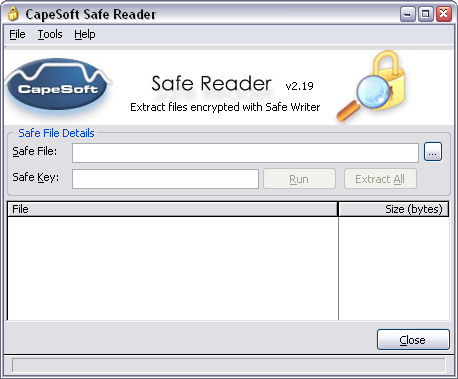
CapeSoft Safe Reader Price
| |
CapeSoft Safe Reader
FREE!
|
|
| |
|
|
| |
Email: |

 |
|
| Telephone: |
+27 21 715 4000 |
| Fax: |
+27 21 715 2535 |
| Web: |
www.capesoft.com |
| Post: |
PO Box 511, Plumstead, 7801, Cape Town, South Africa |
| |
|
|
License & Copyright
This program is protected by copyright law and international treaties.
License Agreement
CapeSoft Software cc, employees of CapeSoft Software cc and Dealers
of CapeSoft Software cc products explicitly accept no liability for any
loss or damages which may occur from using this package. This package is used
entirely at your own risk.
Use of this package constitutes agreement with this license.
Please contact
should
you have any queries.

System Requirements
CapeSoft Safe Reader will operate on the following operating systems:
Windows Server 2008
Windows Vista
Windows XP
Windows 2000 Server
Windows 2000 Professional
Windows NT4 Server & WorkStation
Windows ME
Windows 98
Windows 95
Download CapeSoft Safe Reader
Use the above download site to download CapeSoft Safe Reader to your computer.
Installation
Once you have downloaded
the setup file, please run it and the install program will guide you through the
installation steps. For further information please contact
More on CapeSoft Safe Reader

Version 2.50 (29 August 2008)
- Update documentation, moved to XHTML 1.0 transitional and CSS 1.0.
- Fixed potential GPF when auto-updating.
- Small cosmetic changes to the main window.
- New installer.
- Vista and Windows Server 2008 compatibility/compliance.
- New auto-updating, new code signing of installer and
for automatic updates.
- The file association check has been removed from the
application and all file assocatiations are handled by the installer. This
is Vista and Windows Server 2008 compliant.
Version 2.19 (20 October 2005)
- Can now be run from the command line, with the same sort of
syntax as Safe Writer.
- Now supports secure updates, thanks to CapeSoft Safe Update.
- Added option to turn off caching of the Safe Reader setup
file. Useful if you're having trouble getting the correct version from the
website.
- The list of files in the Safe file is now sorted without
case-sensitivity.
- The window font can now be changed.
Version 2.18 (17 December 2004)
- Fixed bug: List box sometimes showed blank, due to the text being the same
colour as the background.
Version 2.17 (5 November 2004)
- Bug fix: auto-upgrade now works: Safe Reader didn't shut
down properly.
- Bug fix: timer showed incorrect duration.
- Bug fix: progress bar advanced too quickly.
Version 2.16 (4 November 2004)
- Bug fix: extracting more than once in the same session when
the file was DES-encrypted didn't work.
Version 2.15 (29 October 2004)
- Added support for reading Blowfish-encrypted files as well
as CRC-checking.
- The file list box now uses the same mouse and key commands as
a standard Windows list box.
- For those that care, how long the extraction took has been
added to the status bar.
Version 2.14 (18 October 2004)
- Fixed bug: Did not read earlier SAF files.
- Fixed bug: Version auto-update did not work.
Version 2.13 (15 October 2004)
- Fixed bug: Caching actually turned off in this version.
Version 2.12 (15 October 2004)
- Auto-update on startup is now invisible if no upgrade is
necessary.
- Fixed bug: Version update turns server caching off for more
reliable version checking.
Version 2.11 (15 October 2004)
- Fixed bug: Auto-update on startup now functioning.
- Fixed bug: Extract to Safe file path did not work.
Version 2.10 (13 October 2004)
- Fixed bug: Run button was not disabled when running a file
in the safe.
- Version number synchronized with Safe Writer.
Version 2.05 (24 December 2003)
- Fixed bug: Selecting a Safe file from Windows caused the
default extract path to be the last-used path, not the path of the Safe
file.
Version 2.04 (22 December 2003)
- Safe Reader now available in either French/English or
English only.
- Added option to allow automatic overwriting of files.
- Fixed bug: Extract All followed by Cancel kept the buttons disabled and did not hide the
toolbar.
Version 2.03 (21 November 2003)
- Added option to make the Safe file folder the default
extraction path.
- Added further option to make the Safe file folder the
default run path.
- If there is only one file in the Safe file, the file is
automatically selected in the file list.
Version 2.02 (17 November 2003)
- Added Extract and Run option when one or more files are
selected.
- Now supports Window XP Clear Type.
Version 2.01 (11 November 2003)
- Added Save As dialog box when extracting a single selected
file.
- Long file names now don't disappear off the right-hand end
of the windows .
Version 2.00 (10 September 2003)
- Improved user interface.
- Now supports hiding of the safe key .
- Window now moveable and sizeable while extraction is taking place.
- Fixed all known bugs.
Version 1.0 (24 January 2002)


