CapeSoft Safe Writer is used to encrypt files and in so doing to create a
Safe
File (having a .SAF extension), which can then be safely distributed
with virtually no risk of unwanted users reading the files. A password or
key
provided by the user is used for the encryption.
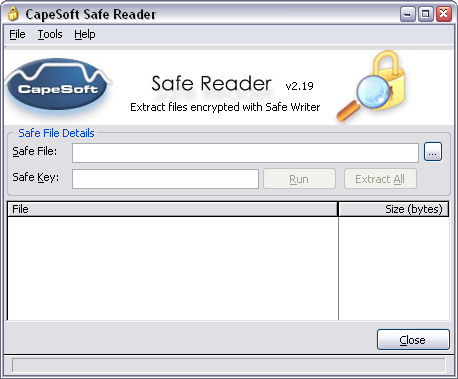
Safe
Reader can then
be used to open and decrypt the Safe File (providing the user has the
correct key).
Feature List
- Opens all Safe Files created by CapeSoft Safe Writer.
- Allows the simultaneous extraction of all the files, or the
extraction of only selected files.
- If the file location information was included by Safe Writer when
the safe was created, files can be extracted to their original
locations.
- Individual files may be extracted and run by the click of a button.
- Can search CapeSoft's website for a new version every time the
program is opened (this can be specified in the Options menu).
- Search the CapeSoft Website for a new version at any time by simply
choosing an item from the Tools menu.
Why Use File Encryption
To help ensure this, a range of security measures can be applied to
contain a
diverse range of threats. One such measure is to protect the data from
unauthorized
disclosure using cryptography (the practice of encrypting/decrypting data
using
a secret password or key word).
DES file encryption software will enable PC users to protect/encrypt their
data/files
without specialist knowledge or difficulty. It allows data to be protected
almost
as routine. So why encrypt your data? Some examples of why are:
- Where sensitive data is to be distributed or saved on portable
media (e.g. floppy disks, backup drive, etc.)
- Where more than one user has access to a PC or where the data is
held on a LAN.
- As an additional measure where a PC already incorporates an access
control mechanism, encryption secures the data itself, that will
remain encrypted even if the PC is lost or stolen.
- Where information is to be transmitted via email or similar media.
Screen Shot
CapeSoft Safe Reader is
FREE!
| CapeSoft Support |
| Email |
 |
| Telephone |
+27 87 828 0123 |
| Fax |
+27 21 715 2535 |
| Post |
PO Box 511, Plumstead, 7801, Cape Town, South Africa |
| CapeSoft Sales |
| Web |
www.capesoft.com
|
| Email |
 |
| Telephone |
+27 21 715 4000 |
| Fax |
+27 21 715 2535 |
| Post |
PO Box 511, Plumstead, 7801, Cape Town, South Africa |
License & Copyright
This program is protected by copyright law and international treaties.
License Agreement
CapeSoft Software, employees of CapeSoft Software and Dealers of CapeSoft
Software products explicitly accept no liability for any
loss or damages which may occur from using this package. This package is
used
entirely at your own risk.
Use of this package constitutes agreement with this license.
Please contact
should you have any queries.