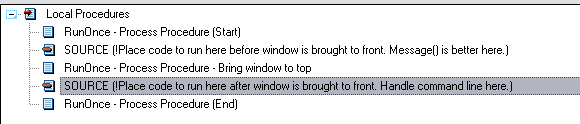
RunOnce ensures your application only opens in one instance. With a
couple of easy steps, your application won't start up twice.
Add RunOnce to your application in a few Easy Steps!
(For
Multi-DLL apps - do this in the
mainexe
application).
- Import the RunOnce_HandleSecondInstance window using the template
utility. Open your application in the Clarion IDE, and select (from
the Application menu) the Template Utility, and then select one of the
following utilities (there's one for ABC and one for legacy):

- Add the global extension (Global -> Extensions -> Insert ->
Activate CapeSoft RunOnce).
- On the Options tab of the Global
Extension template, enter the port number
(use a random number between 2000 and 32000.
- Add the RunOnce - Server window Template
extension template to your frame window (or
another window that stays open continuously. (Procedure properties
-> Extensions -> insert and select the RunOnceServer
template)
- Add NetTalk to this application (in the normal manner as prescribed
in the NetTalk docs) if you have not yet added it. (Note:
for multi-dll applications, you'll need to add the NetTalk extension
to your data dll application as well - if you have not done so
already).
For additional options, take a look at the
RunOnce
templates section of
this document.
Problems in implementing RunOnce:
- If you are getting other instances of
your application opening, make sure that you have completed all
of the above steps (particularly the addition of the
RunOnceServer local extension template).
- If you have a legacy application that
GPFs on startup, see the NetTalk FAQs on how to add the dllmode and
linkmode equates. This fix will be included in NetTalk 4.32.
The Global Extension template:
- On the General tab, you can disable
RunOnce by checking the Disable all RunOnce
Features checkbox. This is useful for debugging (without
having to remove the template).
- On the Options tab:
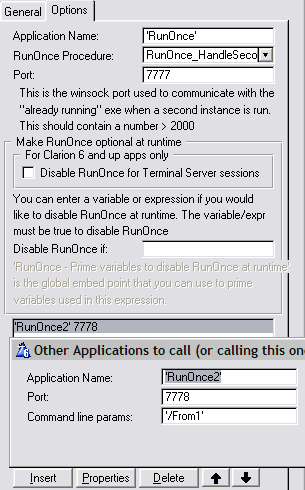
The
Application Name is used to
register the mutex to identify a unique application. By
default this is the name of your application, but you
can make it something else if you want to identify more
than one exe to the same application name. Use 'Quotes'
or a variable for this. If you want to prevent users from running multiple
copies of the program (ie first user to run it is ok, but other users
fail, then prefix the Application Name with
Global\
The
RunOnce Procedure is the
procedure that is used to handle a second instance of
the exe that is run. This procedure will pass focus to
the main procedure and send any commandline parameters
to the current instance of the application.
The
Port number is the winsock port
that is used to communicate between the second instance
and the first instance of the application. This should
be unique (across all applications running) in order to
enable communication between both instances of the
application.
If your Clarion 6 application will be used in Terminal Server
(TS) environment, then you can check the
Disable
RunOnce for Terminal Server sessions checkbox
to disable runonce when your application is running in a
TS environment
You can also enter an expression in the
Disable
RunOnce if prompt that (if evaluates to
true) will disable RunOnce at runtime. This means that
you can disable or enable runonce for different
clients/environments. Use the Global embed point: 'RunOnce
- Prime variables to disable RunOnce at runtime' to
prime variables used in this expression - before RunOnce
is activated at runtime.
If you have additional applications that you want to communicate with
(when a second instance starts up), then you can enter them into the list.
This is useful for a "close all" type instruction, where you could
instruct other applications to close down. The port and application name
must match the RunOnce settings of the other application. You can populate
the RunOnce - Run Another Application code template at the embed point
where you want to this app to call the other application.
The RunOnce Server local extension template
This template is added to a window in your application that
is always running. This will handle communications for the first
instance of the exe that are received from a second instance.
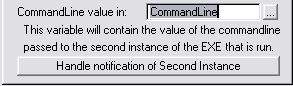
- The CommandLine value in field allows you
to enter a field that will contain the commandline passed from the
second instance.
- If you want to add code to when the second instance sends a
commandline, then you can use the Handle
notification of Second Instance embed button on the template
to access the correct place in the code to do this.
NOTE: You can add code to handle the arrival of the
notification from the second instance using this same embed point: