Requirements:
- Clarion 6 and up
- CapeSoft Draw
- xFiles (optional, but necessary for
importing & exporting report structures.)
Introduction
RightReports allows you and your end users to create,
edit and print reports in your application.
Think of it as a completely customizable Report Writer, which you have
complete control over. Taking your existing dictionary, you are able to
compile a report writer which is specific to your application. There's no
need to ship any dictionary, or txd files, because the program is built
specifically around your files.
You can include this report writing functionality directly in your
program, or you can create a separate program for it if you prefer. Either
way there is no runtime royalty necessary - you are free to ship as many
copies of your program as you like.
All Right Reports code is shipped as source, so there are no black boxes.
You are free to add functionality to the report engine, plus you have
complete control over the look of all the windows.
The reports can consist of any data from your tables, along with built in
functions, calculated values, conditional values and any custom functions
you choose to code, and add. You can also suppress tables from the report
engine, or suppress individual fields in tables.
The structures of these created reports are stored in tables imported to
the application's dictionary. Reports can also be imported and exported
(as XML, using XFiles) to allow easy delivery of new or changed reports to
users.
Target Market
Clearly not all users are in a position to write
reports. While Right Reports gives them the ability to write reports from
scratch, chances are (at least at the beginning) not many end users will
have the skills, or ability, to do this. As Right Reports matures we
expect this to get easier.
That doesn't mean all is lost however. Editing existing reports is pretty
straight-forward, so end users should be capable of making small and
cosmetic changes to their reports. In addition, in conjunction with xFiles
you'll have the functionality that allows you to export and import report
definitions as xml files. So You're free to make custom reports, then
email them to your client as an attachment. They import into the
application and they're away.
Features
- Easily create custom reports for your users, without having to
recompile your application.
- Customize reports for specific users, without bloating your
application.
- Users create, edit and print reports easily
- Importing and exporting of reports for ease of mobility
- Nested table loops, as well as multiple secondary loops for the same
parent loop
- Easy to add
- No runtime-royalty costs
- Complete flexibility
- Create your own custom report functions and variables.
- All-Source code, so no black boxes.
- Reports can be graphical (ie include text, images, lines, boxes) or
textual (ie include just text strings).
- Use Text-Reports to build exports exporting your data to other
programs.
- Compatible with other 3rd party previewers
- Right Reports are not built on existing Clarion Reports, however
"normal" clarion reports, and Right-Reports happily co-exist in an
application.
Limitations
- Only generated applications are supported. Handcoded applications
are not supported.
- Currently the engine uses a complete File-Driver approach, so there
is no additional functionality specific for SQL engines (yet) but we
do plan to add support for alternate data sources (such as SQL Select
statements). The engine works on any backend that is supported by a
Clarion file driver (including ODBC).
Basic Approach
Adding Right Reports to an application requires a few
easy steps and minimal effort by the programmer.
Import the Right Reports tables into your dictionary.
Import the Right Reports functions into your application.
Compile and Run.
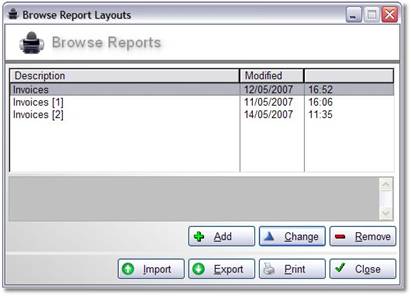
Running reports is as simple as picking a report from a list, then
clicking the Print button.
Remember these windows are in your app, so you have complete control over
what they look like.
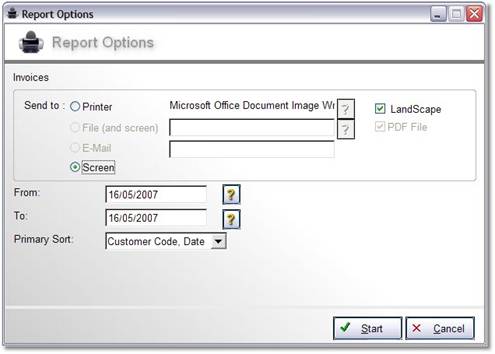
The Report Options screen appears. Note the custom fields which the user
can use to set parameters for the report. Up to 10 of these fields can be
declared for each report.
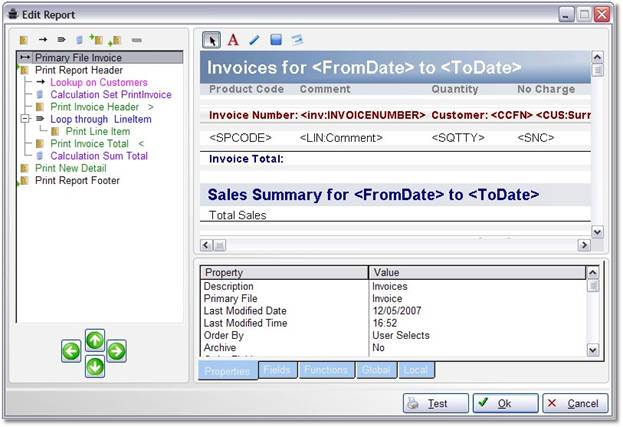
If instead of printing a report, you wish to edit it, then bring up the
report editor window, which allows you to see the tree-view of the report
structure, the band details, and the properties for all the controls, all
on one window.
Compatible With
| Clarion 8 |
No |
| Clarion 9 / 9.1 |
Yes |
| Clarion 10 |
Yes |
| Clarion 11 / 11.1 |
Yes |
| Clarion Templates |
Yes |
| ABC Templates |
Yes |
| Local Mode |
Yes |
| DLL Mode |
Yes |
| Multi DLL |
Yes |
Documentation & Support
Documentation for the product is available
here.
Go
here for further support.
Cost
For other payment options please contact us
here
Refund Policy
CapeSoft believes that if you aren't satisfied with our products, we would
like them back - and we
will refund you the money. This allows you to purchase our products with
confidence.
You can read our full refund policy
here.

 Gold
Gold